Chrome extension for Google Flow

You write the prompts. It runs Flow.

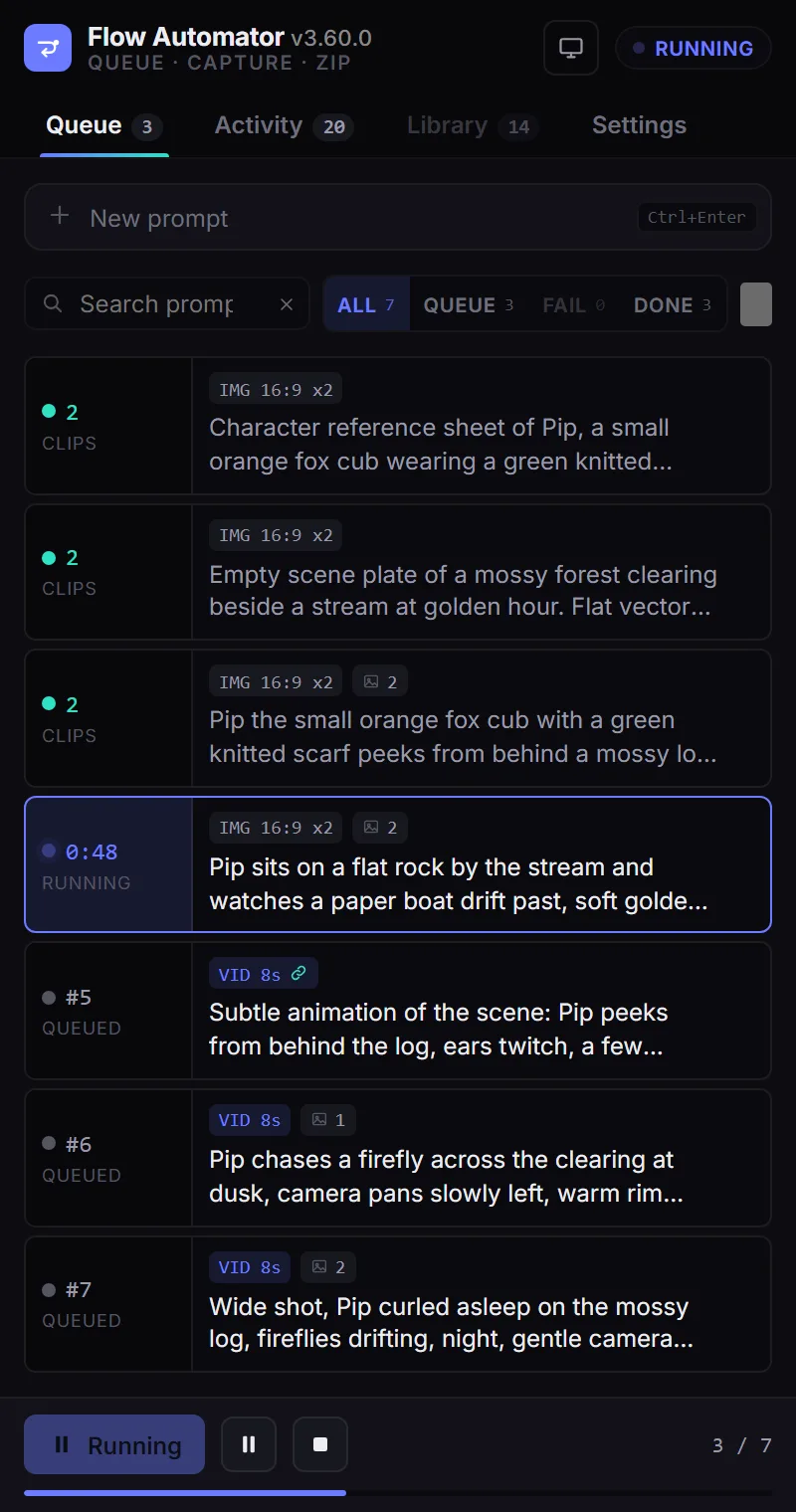
Queue every shot up front with its own reference images and settings. Flow Automator submits them one after another, captures every clip and still as it renders, and hands you the whole batch as one zip. An MCP server lets Claude Code, Codex or Cursor run the same queue.

x1 x2 x4every take captured
4 GB+zips that still open
39MCP tools
0analytics, ads, accounts
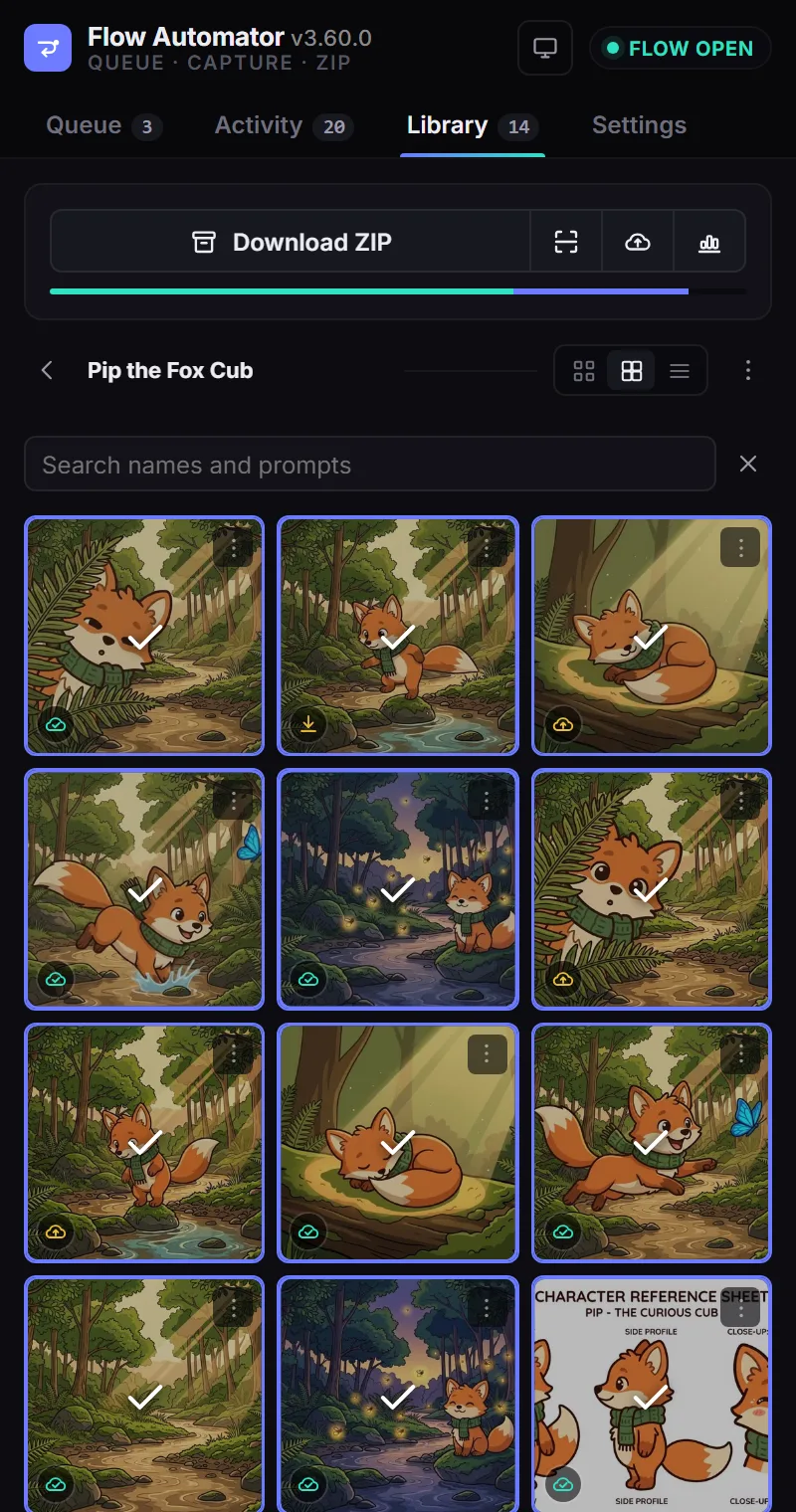
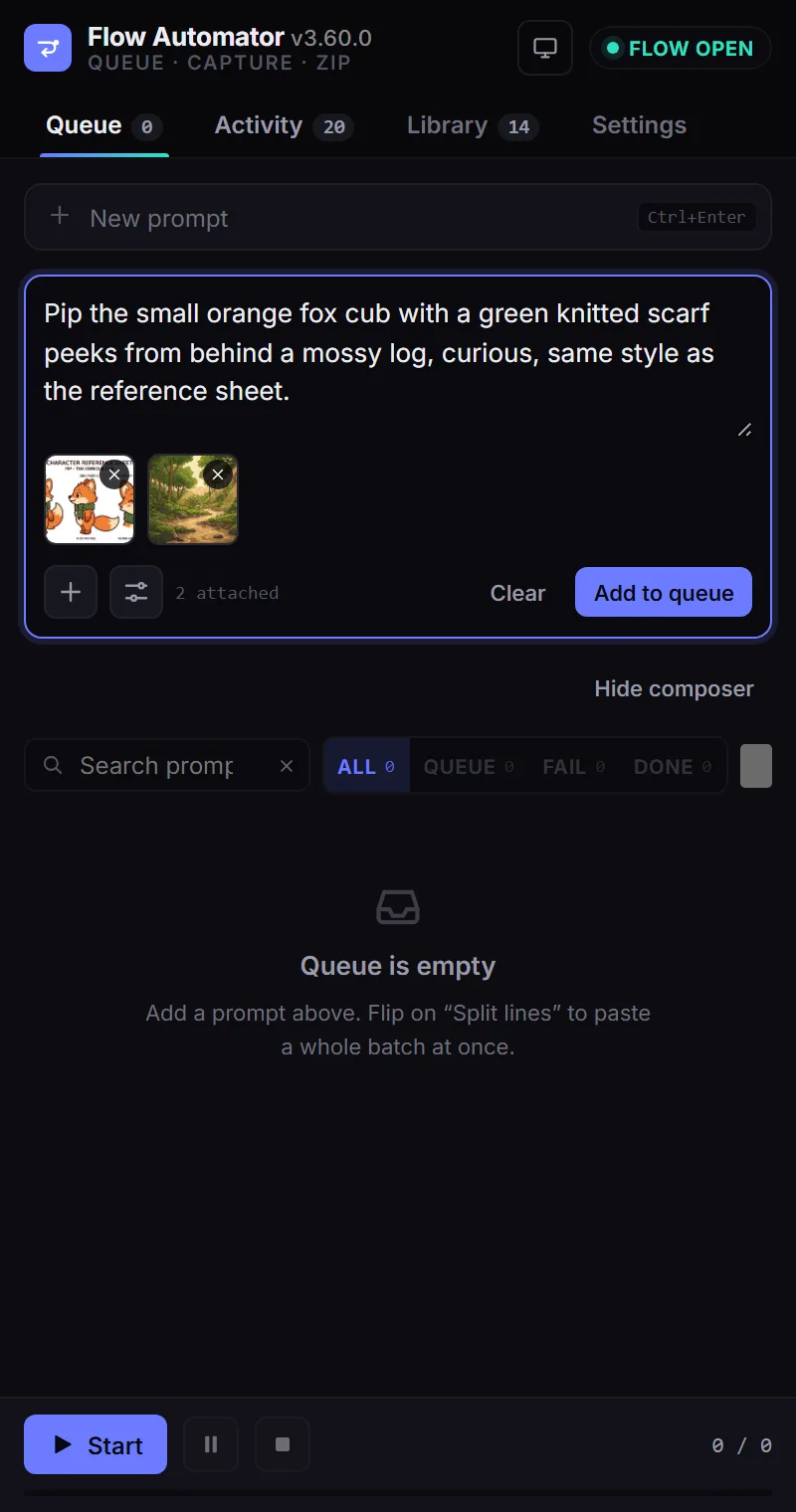
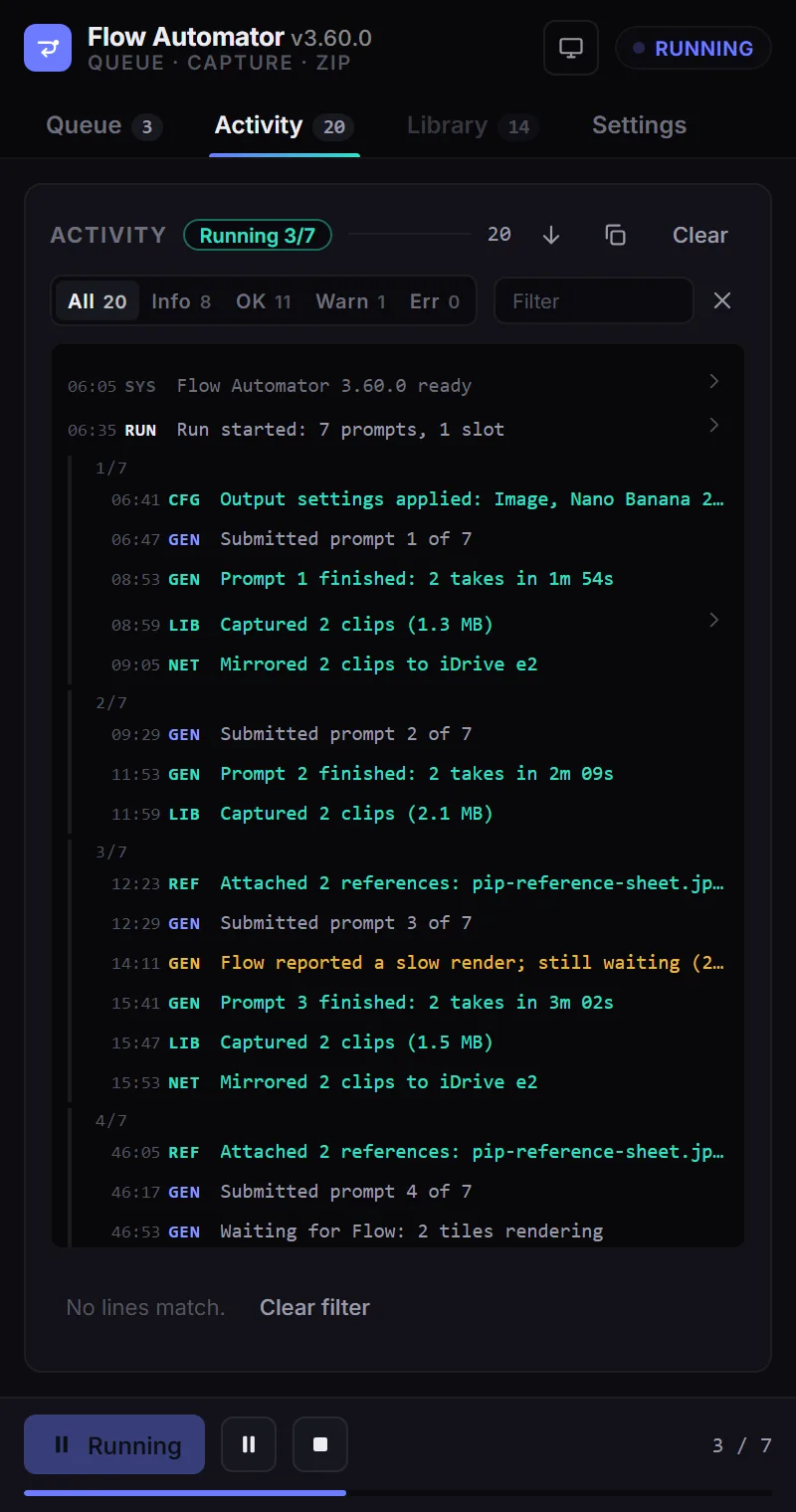
The Queue tab with seven prompts, one running The Activity tab logging a run The Library tab showing captured clips The composer with a prompt and two reference images
How it works

The run, as the extension reports it.

This is the Activity deck from a real seven-prompt batch. Every submit, wait, capture and mirror gets a line, tagged by the part of the extension that did it, so prompt 14 of 40 never disappears into a spinner.

ACTIVITYRunning 0/70
    Tagged, not buriedRUN, GEN, REF, LIB, NET, MCP, CFG and SYS channels. Filter to warnings only, search by prompt, copy the whole log.
    Grouped per promptLines nest under the prompt that produced them, oldest first, so a run reads top to bottom like a script.
    Honest about waitingA slow render says how long it has waited and how long it will, instead of pretending nothing is happening.
    Features

    Built for batches, not one prompt at a time.

    Flow is designed around a single composer. Flow Automator wraps a queue, a capture pipeline and a library around it, using Flow's own interface rather than an unofficial API.

    A queue with per-prompt settings

    Each prompt carries its own reference images, model, aspect ratio, output count and video length. Paste a whole list and split it into rows. Reorder by drag, edit in place, run one now.

    Veo 3.1 Nano Banana 2 Imagen 4

    Chain one output into the next

    Mark a prompt to take the previous prompt's first output as its reference. A character sheet becomes a scene, the scene becomes a video, without you attaching anything by hand.

    Unattended, with retries

    Waits for Flow to finish, claims the right tile even when several are rendering, retries a refused render once, then reports it. Set the pacing and how many generations may wait at once.

    Every take, original size

    An x4 generation yields four files, not the one Flow's download button happens to show. Captured at Flow's 1K original the moment it lands, video and stills alike.

    A library, by project

    Clips land in folders that mirror your Flow projects, searchable by name and prompt, with tile, thumbnail and list views and a badge that says where each file lives.

    One zip, built in the browser

    Select what you want and download a single archive. Written with ZIP64, so a 6 GB batch opens correctly in Explorer, Finder and 7-Zip.

    Flow MCP server

    Let your coding agent run the queue.

    The extension ships a Model Context Protocol server. It listens on 127.0.0.1 only, needs a token the setup guide mints for you, and stays off until you turn it on. Every tool forwards to the same commands the side panel uses, so the agent and the panel can never disagree.

    # one line per client, printed by the setup guide
    claude mcp add flow-automator \
      -e FLOW_MCP_TOKEN=<token> \
      -- npx -y flow-automator-mcp
    
    # then, from the agent
    flow_add_prompts  { prompts: [...] }
    flow_run_batch
    flow_wait_idle    { timeoutMs: 1800000 }
    flow_export_clips { dir: "./renders" }
    Claude CodeCodexCursorWindsurfClaude DesktopGemini CLIany MCP client
    flow_add_promptsflow_run_batchflow_wait_idleflow_export_clipsflow_list_queueflow_edit_promptflow_reorder_queueflow_projectsflow_new_projectflow_assetsflow_stage_clipsflow_zip_downloadflow_agent_sendflow_cloud_syncflow_memory_get+24 more
    Write the shots

    The agent drafts a shot list from your brief, decides which prompts need a reference and which chain from the previous output, and queues them with the right model and aspect ratio.

    Render on Flow

    It starts the batch and waits. The extension does the clicking, typing and waiting inside the Flow tab, and reports each prompt's outcome back over the bridge.

    Pull the files

    Finished MP4s and stills are written to a folder on disk, named and numbered, ready for the next step: an edit, a Remotion composition, an upload.

    Or skip the agent

    The same package is a CLI. npx -y flow-automator-mcp cli status answers from a terminal, and every tool has a matching command.

    Use cases

    Who runs Flow this way.

    Shorts and TikTok channels

    Forty clips a day, one sitting.

    Write the day's prompts in the morning, press Run, and come back to a zip. The Activity tab tells you which three Flow refused and why, so you re-queue those instead of hunting through the grid.

    Animation and storyboard

    A character that stays the same character.

    Generate a reference sheet, chain it into every scene prompt, then chain each scene into its video. Continuity comes from the queue, not from re-attaching the same image twenty times.

    character sheetscene platestill with character8s video
    Agencies and studios

    Dozens of variations per brief.

    One prompt, four aspect ratios, three models. Queue the matrix, capture every take, and hand the client a folder organised by project rather than screenshots from a tab.

    Developers and pipelines

    Flow as a step, not a destination.

    An agent writes the shots, renders them through the MCP bridge, exports the files and feeds them to an editor or a Remotion render. Nothing in the loop needs a human at the browser.

    Optional

    Off until you switch it on.

    Three features talk to something outside the browser. Each is a switch in Settings, each is off on a fresh install, and the extension works fully without them.

    Cloud storage

    Mirror clips to a bucket you own

    Every captured clip is uploaded to an S3-compatible bucket (iDrive e2, R2, S3) through a small signing worker you deploy. A clip missing locally is fetched back from the bucket before Flow is asked again.

    Persistent memory

    Survive a reinstall

    Project names, clip ids and the asset id mapping Flow only reveals while a tile is mounted are kept against a key you hold, so a second machine does not start from nothing.

    Flow Agent mode

    Drive Flow's own agent

    Send it messages, manage its instructions and sessions, and approve its proposals from the queue. Verified end to end: a character sheet, a scene plate, five stills and five videos from one message.

    Privacy

    Your prompts and clips stay in your browser.

    The extension runs only on labs.google. There is no account, no analytics and no advertising. The full policy names every permission and what it is for. Read the privacy policy.

    • Queue, settings and captured media live in extension storage on your machine.
    • The MCP bridge is loopback only. A wrong token is refused before a frame is read.
    • Nothing reaches us unless you enable memory, and then only identifiers, never clips.
    • Trusted clicks go through Chrome's debugger on the Flow tab only, during a run only. It reads no page data.
    FAQ

    Questions people ask before installing.

    Does it use an unofficial Flow API?

    No. It drives the Flow page you are signed in to, the way you would: fills the composer, sets the output options, presses Generate, waits, and reads the rendered tiles. Your credits, limits and account are exactly what they are in Flow.

    Why does Chrome warn about the debugger permission?

    Flow ignores clicks and keystrokes that come from a script, so the extension sends trusted input through Chrome's debugging protocol. It attaches to the Flow tab only, only while a batch or agent command is running, and detaches when done. It never reads page content, cookies or network traffic through that channel.

    Do I need the MCP server?

    No. Queueing, capturing and zipping are complete inside the side panel. The MCP server is for people who want Claude Code, Codex, Cursor or another agent to operate the queue. It needs Node 20 or newer and is off by default.

    What happens when Flow refuses a render?

    The extension retries once using Flow's own Retry when it is offered, then marks the prompt failed with the reason in the Activity tab. Retry failed prompts later with one button. Nothing is dropped silently.

    How big can a batch be?

    As big as your storage. Clips stage in the extension's own storage, and the zip writer emits ZIP64 records, so archives past 4 GB open correctly everywhere. Optional cloud mirroring and a local budget keep the browser lean on long projects.

    Is it affiliated with Google?

    No. Flow Automator is an independent project. Google, Google Flow, Veo, Imagen and Gemini are trademarks of Google LLC.
    Queue tonight. Zip in the morning.

    Free on the Chrome Web Store. Works with the Google Flow account you already have.